This guide describes the functionality and usage of the Uniguest S2 Remote.
The Uniguest S2 Remote can control LG, Samsung, and Philips screens.
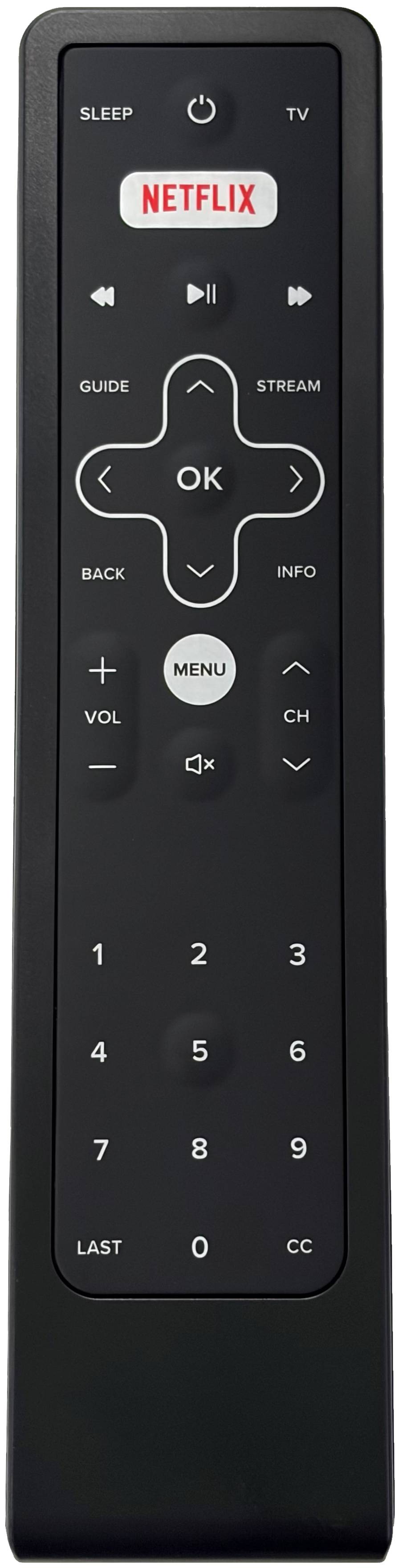
Batteries are not included
¶ Programming the Remote
Samsung and Philips modes support quick programming. For LG, it is recommended not to use quick programming. Instead, use the 5-digit code shown below.
¶ LG
For remotes shipped before May 22nd 2026:
- Hold down Power and 2 until the LED blinks twice.
For remotes shipped after May 22nd 2026:
- Hold down the Sleep key until the LED under the Power key blinks twice.
- Press and release the Power key.
- Enter the 5-digit code: 05786.
¶ Samsung
Remotes ship pre-programmed incorrectly for Samsung — this step must be completed before use.
- Hold down Power and 4 until the LED blinks twice.
¶ Philips
- Hold down Power and 3 until the LED blinks twice.
¶ Functionality
- Includes a backlight.
- Easy to clean.
¶ Back cover removal
- Press at the bottom of the remote and slide the back cover upwards
¶ Limitations
¶ LG
- Quick programming for LG is not recommended, as the TV, CC, SLEEP, and STREAM buttons do not work properly with the Hub system when using LG quick programming.
- The LAST button works as Exit.
- STREAM and INFO buttons are not yet implemented in Hub.
¶ Samsung
- SLEEP, STREAM, and INFO buttons are not yet implemented in Hub.
- The LAST button acts as a Back button.
¶ Philips
- SLEEP, REVERSE, PLAY/PAUSE, and FAST FORWARD buttons do nothing.
- STREAM and INFO buttons are not yet implemented in Hub.
- The LAST button acts as a Back button